
On this page
If you’re like 99% of teams, you are using Azure tags completely wrong.
You probably think they are just sticky notes for FinOps. A way to figure out which department to blame when the monthly cloud bill spikes.
But what if I told you a simple, boring Azure tag is actually the most powerful, unbreakable security guardrail you have?
The Scenario
You’ve brought in a third-party to deliver a project in your tenant.
They need to move fast. They’re building infrastructure, deploying apps, and testing constantly. You don’t want to slow them down with approvals and tickets, so you give them Owner access to their subscription.
On paper, it makes sense.
They’ve got everything they need. No blockers. No waiting around.
However, they’re not just able to build; they can change or remove anything in that subscription. And they don’t fully understand your environment. They don’t know which route tables are critical, which peerings connect back to your hub, or what dependencies exist outside their project scope.
So all it takes is one change. Not malicious, just uninformed.
A route gets updated. A peering gets removed. Something “unused” gets cleaned up.
And just like that, connectivity is gone. Not just for them, but potentially for anything relying on that shared foundation.
Now you’re in a bad spot.
You can’t fully lock them down because they need enough access to do the job. But giving them full control means your core platform is exposed to mistakes.
So the real problem becomes clear:
How do you give a third party the freedom to build in your tenant, without putting your core environment at risk? 🤔
Why the Obvious Answers Didn't Work
If you ask around, you’ll get three confident answers. On paper, they sound solid.
In your scenario, they fall apart.
Resource Locks
“Just lock the critical networking.”
Sounds good until you remember… you gave a third party Owner access.
An Owner can remove the lock in seconds. No escalation. No barrier. If they don’t realise what that lock is protecting, it’s gone, along with whatever sits behind it.
That’s not protection. It’s decoration. A False sense of control.
Custom RBAC
“Fine, restrict access properly with custom roles.”
In theory, you create a role that lets them build freely but blocks specific shared components.
In reality, it turns into a maintenance nightmare.
Every new project needs adjustments. Every new Azure feature introduces new permissions you didn’t account for. Your role definitions become bloated, fragile, and constantly outdated.
Now instead of protecting the platform, your team is stuck maintaining permission JSON full-time.
Deployment Stacks
“This is exactly what Deployment Stacks are for.”
And that’s true. They solve the problem properly with deny assignments that even Owners can’t override.
But here’s the catch.
They’re built around Bicep.
If your environment runs on Terraform, this isn’t a solution. It’s a migration project. And no one is rewriting their entire infrastructure stack just to plug this gap.
So you’re stuck again.
You need something that:
Still works even when someone has Owner access
Doesn’t create an RBAC maintenance burden
Fits into your existing Terraform setup
That’s a very short list.
And that’s where something as basic as a tag starts to look a lot more interesting.
The Tag
Instead of trying to control the third party directly, you control the state of the resources they interact with.
The shift:
Stop treating tags like labels. Start treating them like a switch.
A simple yes/no:
Is this resource protected?
You define a tag, for example:
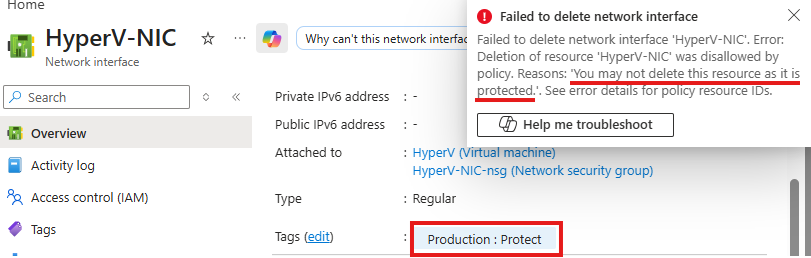
Production: Protect
That tag isn’t for organisation. It’s a signal to Azure: this cannot be touched.
Now you build around that.
Layer 1: The Lock
You attach policy to the tag, not the person.
Two policies do the heavy lifting:
A Deny policy blocks any updates to tagged resources
A DenyAction policy blocks the deletion of tagged resources
What this means for the third party with Owner access:
They try to change a route table. Blocked.
They try to delete a peering. Blocked.
It doesn’t matter who they are. The Azure control plane rejects the request before it even hits the resource.
Meanwhile, everything without that tag stays wide open.
They still have full control over:
Their VMs
Their storage
Their own VNets
So you haven’t slowed them down. You’ve just made the foundation untouchable.
Layer 2: The Medic
Here’s the obvious attack:
“Fine, I’ll just remove the tag first.”
And yes, with Owner access, they can try.
So you close that gap.
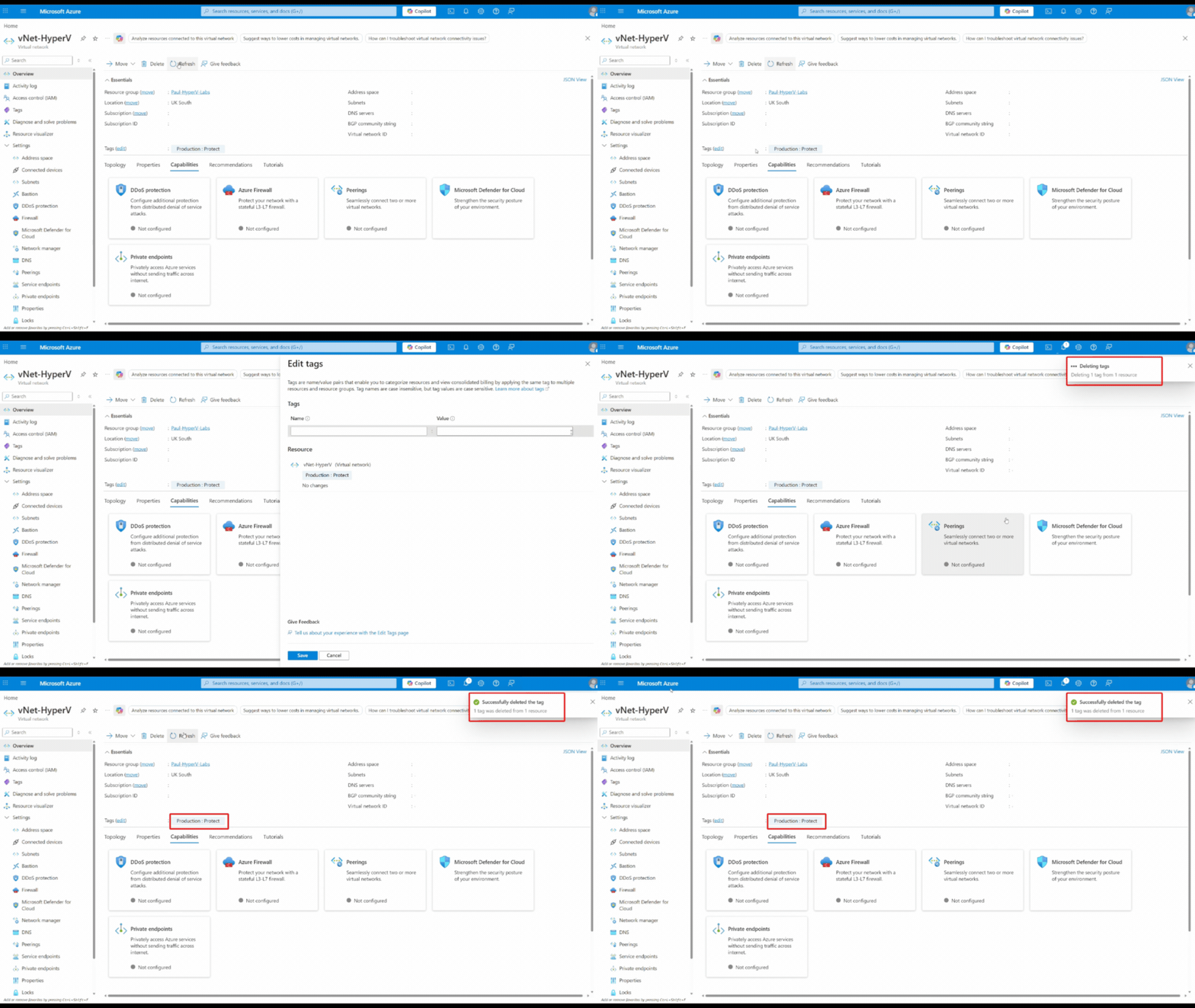
A third policy with a Modify effect automatically re-applies the tag whenever the resource is updated.
They remove the tag... it comes back.
They try to create a gap... it closes almost instantly.
The window to bypass protection becomes so small it’s practically unusable.
Now you’re not relying on people doing the right thing.
You’ve built something that corrects them when they don’t.
Layer 3: The Cookiecutter
This is where most people miss the real power.
You don’t have to lock the entire resource.
Let’s go back to your third party.
They might need to work inside a VNet. Fine. Let them.
But maybe your DNS settings are critical because they tie back to on-prem or shared services.
With policy targeting specific properties, you can lock just that piece:
DNS config = protected
Everything else = editable
Now they can build, change, iterate… without ever being able to break the part that actually matters.
So instead of fighting Owner permissions, you sidestep them.
You’re not restricting the user.
You’re defining what can’t be changed, regardless of who tries.
That’s a completely different level of control.
The Payoff: No Rebuild Required
Remember the earlier dead end with Deployment Stacks?
Great idea. Wrong constraint.
They force you into Bicep. If your entire estate runs on Terraform, that’s not a solution, that’s a rewrite.
This approach doesn’t have that problem.
It’s completely tool-agnostic.
You take the policies:
Deny
DenyAction
Modify
Bundle them into a Terraform module, and deploy it like anything else in your stack.
No migration. No compromise.
Roll It Out Without Breaking Anything
You don’t have to go all-in blindly either.
Start with audit mode.
Deploy the policies, but don’t enforce them. Just observe.
Watch what would have been blocked:
Would that third party have broken a route table?
Would a deployment have failed?
You get real data, not guesses.
Once you’re confident, switch to enforcement:
Deny goes live
DenyAction goes live
Modify kicks in
Now the protection is real, and you know it won’t disrupt legitimate work.
What This Actually Solves
Go back to your original problem.
You’ve got a third party with Owner access in your tenant.
Before:
You either slowed them down with restrictions
Or trusted they wouldn’t break anything
Neither scales.
Now:
They still have full control over what they build
But they physically cannot damage the shared foundation
Not because you restricted them,
but because you defined what the platform refuses to allow.
The Shift Most People Miss
This is where people get it wrong.
They treat governance like access control:
“Who is allowed to do this?”
That’s the wrong question.
The better question is:
“What is allowed to happen to this resource?”
Once you make that shift, everything changes.
You stop fighting Owner permissions
You stop maintaining fragile RBAC setups
You stop blocking engineers just to stay safe
Instead, you lock the state of what matters.
Your engineers, your third parties, whoever is working in the environment, they can move fast, deploy freely, experiment.
But the critical networking underneath?
Tagged. Protected. Untouchable.
Stop thinking of tags as metadata for billing reports.
Used properly, they’re enforcement points.
And in a setup like this, they’re stronger than permissions.